ProjectsLive
What Do I Actually Do?
A two-minute tool that maps your work week into a one-page blueprint: what to fix, what to automate, where AI helps, and what stays human.
Open the project (opens in a new tab)mapyourworkflow.com
Hypothesis
Once people can see their own work, most of their stuck points turn out to need a process fix or a simple rule, not AI.
Most people can’t say where AI or automation fits in their job, because nobody ever mapped the job. A new tool arrives, the fit isn’t clear, and people go on working the old way. The premise of this tool is simple: you can’t automate work you can’t see.
Method
A free tool that takes about two minutes.
- You tap through your week: which of 21 common workflows you run, roughly how many hours each takes, and which step drags.
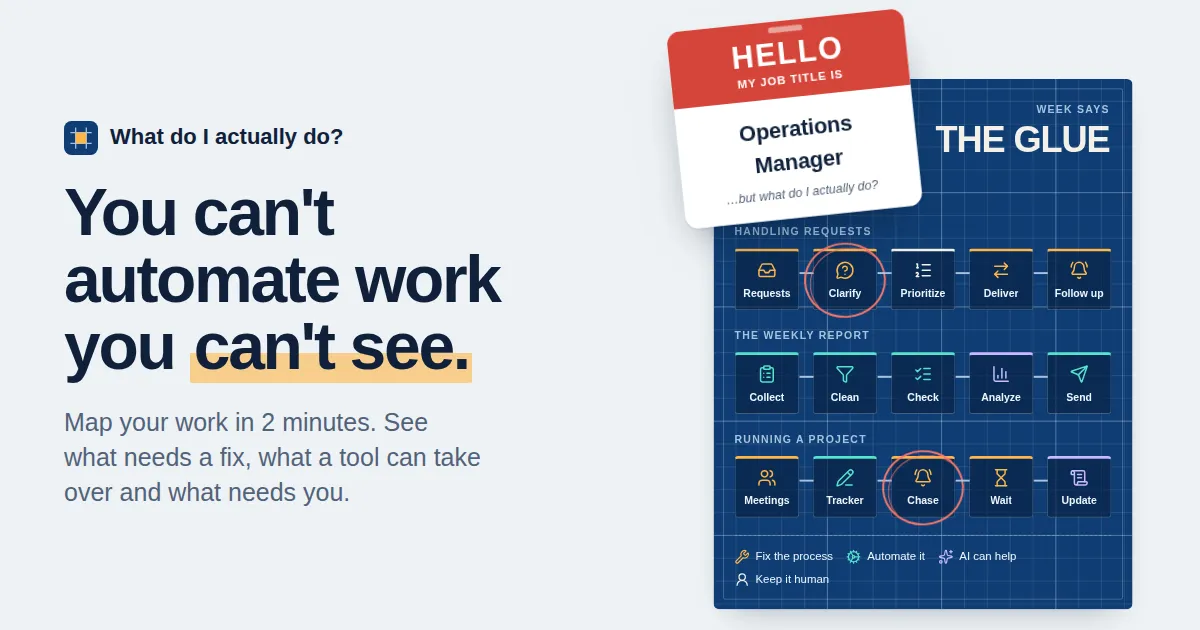
- Every step goes through the four questions of Fix First, AI Last, in order, and gets one label: fix the process, automate it, AI can help, or keep it human. The first “yes” decides, so the cheapest fix always wins. AI is the third question, not the first.
- You get a one-page blueprint of your workflows with the stuck points circled in red, an estimate of how your hours split across the four labels, a range of time you could get back, and three next steps: one fix for this week, one tool to try this month, and one conversation to have with your team.
- AI steps come with a starter prompt you can paste into any assistant.
- It ends with a shareable image and a post you can edit into your own words, because tools tend to stick when a team looks at its work together.
- Team leads can combine everyone’s links into a team view that shows shared stuck points and one fix to make together.
How the tool keeps itself honest:
- No sign-up, no database, no stored answers. Answers are packed into the link itself, so sharing a blueprint means sharing a link, and nothing is kept on a server. The same trick makes the team view possible without accounts.
- Stated assumptions. Answer bands become hours (under two hours counts as one, ten or more as twelve), and the time-back range assumes you capture 35% to 65% of the best case, because nobody gets the best case everywhere. The method is written out on the page.
- Two minutes or it doesn’t happen. Every answer is a tap, not a text box. Nobody maps their work if mapping is work.
Result
Live at mapyourworkflow.com since September 2026. Answers live only in each person’s link, so there’s no central dataset, by design.
What building it showed:
- Vocabulary is the interface. “Workflow” and “automation” mean little to most people. “Chasing,” “waiting” and “redoing” mean a lot.
- A link can be both the data and the permission. Packing answers into the link settled privacy and sharing in a single decision.
- A tool teaches a framework better than a slide does. People remember the label their own step received.
What I’d change
- Find a private way to see the pattern. Storing nothing was right for trust, but it means the hypothesis gets tested one blueprint at a time. An opt-in, anonymous tally of labels would test it across everyone.
- Check the time-back range against real hours. The 35% to 65% capture band is a stated assumption. A few teams tracked for a month would show whether it holds.